
The iRobot Roomba 700 series introduced the AeroVac Series 2 cleaning head, which routes incoming airflow directly across the brush cage to strip hair and debris off the counter-rotating brushes before it can wrap the bearings. That design change made the 700 generation meaningfully more effective on carpet than the 500 and 600 series before it, and it produced a platform with a predictable, clearly defined maintenance rhythm. Across all sixteen named models, from the entry-level Roomba 700 to the flagship Roomba 790, the consumable maintenance set is identical. This guide covers the full service schedule for every model in the series and explains where the three internal generations differ in ways that affect service planning.
Why iRobot Roomba 700 series robots need more frequent maintenance
The AeroVac Series 2 airflow path loads the filter faster than any earlier Roomba platform
The AeroVac Series 2 bin creates a continuous airflow lane that runs across the full width of the brush cage and draws directly into the filter cartridge at the rear. Because the brush-stripping function and the filtration function share the same airstream, the filter sees substantially more particulate per session than a standard-bin design does. A filter installed in the Roomba 780 or the Roomba 790 in an average household will shift from clean off-white to a consistent mid-grey in under two months of regular use. That colour shift is iRobot’s own published signal for replacement. Tap-cleaning extends a filter’s usable life by a session or two, but it does not restore a medium that has become uniformly grey across the pleats, and running with a loaded filter is the primary driver of reduced suction and extended run time on this platform.
Dual counter-rotating brushes share end-cap bearings that collect fibre invisibly
The 700-series cleaning head pairs a bristle roller with a flexible beater brush, both running in the same yellow end-cap bearings at each end of the cage. iRobot’s service documentation treats the two brushes as an inseparable set, and the reason becomes clear at service time: the yellow bearings accept fibre from both brushes simultaneously, compacting it into a mat that is not visible from outside the cage. A brush pair that looks clean from above may have bearings that resist manual rotation, and a cage that does not spin freely by hand is close to triggering a stalled-brush error. The complete service procedure is to pull both brushes as a set, cut hair from the full length of the bristle roll, check the beater’s rubber vanes for stiffness, clear both yellow bearings of compacted fibre with a pin or fine tweezers, and confirm free rotation before refitting. iRobot recommends cleaning every one to three uses, or weekly in pet households, and replacing the brush pair every four to six months.
Six cliff sensors and, from the 770 onwards, optical bin sensors stop the robot when they are dusty
The 700-series runs on iAdapt reactive navigation without a persistent map, so a dusty sensor does not trigger a reroute; it triggers a hard stop. Six cliff sensor openings are positioned around the underside of the chassis, one more pair than on the 500 generation, and they accumulate dust where kicked-up debris settles during a cleaning session. iRobot specifies a weekly wipe of all six openings with a clean dry cloth, and melamine foam where residue has baked on. From the Roomba 770 onwards, two optical bin sensors inside the bin chamber monitor debris level to drive the full-bin indicator. These sensors require their own fortnightly wipe: a thin residue film on either optical window is enough to trigger the full-bin indicator at half capacity, which causes the robot to return to dock well before its cycle is complete. Units earlier than the 770 lack these sensors entirely, so a false full-bin reading on a pre-770 unit points to a different cause.
Two battery chemistries mean two different replacement timelines within the same series
The 700-series spans two battery generations. Units from the Roomba 700 through to the Roomba 776 (PET) shipped with a 14.4 V NiMH pack inherited from the 500 and 600 generations, with a service life of approximately eighteen to twenty-four months in daily use. From the Roomba 780 onwards, iRobot introduced the XLife 14.4 V lithium-ion pack, rated for roughly twice the NiMH cycle count and carrying a service life of approximately thirty to thirty-six months. Neither chemistry is maintenance-free. The charge-management circuit on both types only operates when the robot is resting on the Home Base, so storing the robot docked and powered is the single most effective action an owner can take to extend pack life between replacement intervals.
Models in this series compared
All sixteen named 700-series models share the AeroVac Series 2 bin, the same bristle and flexible beater brush pair, the same 3-arm side brush, and the same Home Base charging platform. The consumable maintenance set is therefore identical across the entire range. The three internal generations are distinguished by their interface, their barrier accessory, and from the 780 onwards, their battery chemistry. The table below maps those distinctions, and the H3 sections that follow describe what each distinction means for service planning.
| Model group | Interface | Battery | Barrier accessory | Notes |
|---|---|---|---|---|
| Roomba 700, 760, 761, 765 (PET) | Single CLEAN button, status LED ring | 14.4 V NiMH | Virtual Wall | Entry tier; no day-of-week scheduler, no optical bin sensors. |
| Roomba 770, 772, 772e, 774, 775 (PET), 776 (PET) | Keypad with 7-day scheduler | 14.4 V NiMH | Virtual Wall Lighthouse (dual mode) | Adds optical bin sensors and day-of-week programming. |
| Roomba 780, 782, 782e, 785, 786 (PET), 790 | Touch-LCD, SoftTouch keypad | 14.4 V XLife Li-ion | Virtual Wall Lighthouse (dual mode) | Top tier; extended battery life, brighter status readout. |
Entry-tier 700 models
The Roomba 700, Roomba 760, Roomba 761 and Roomba 765 (PET) represent the entry point of the 700 platform. These units carry the single CLEAN button, a basic LED status ring, no day-of-week scheduler, no optical bin sensors, and a 14.4 V NiMH battery. Because the NiMH pack loses usable capacity more rapidly than lithium-ion, a unit of this generation running for fewer than thirty-five minutes on a full charge is very likely reporting an ageing battery. Confirm battery condition before replacing any cleaning consumable on a unit in this group with a short run-time complaint. The consumable service intervals are identical to the rest of the series.
Mid-tier 700 models with scheduler and optical bin sensors
The Roomba 770, Roomba 772, Roomba 772e, Roomba 774, Roomba 775 (PET) and Roomba 776 (PET) introduce day-of-week scheduling via an on-robot keypad, the dual-mode Virtual Wall Lighthouse in place of the older single-mode Virtual Wall, and the two optical bin sensors inside the bin chamber that drive the debris-level full-bin indicator. That last addition is the one with a direct maintenance implication: a residue film on either optical window triggers a premature full-bin signal, sending the robot back to dock before its cycle is complete. The 772e is a regional variant of the 772 with a minor bundle difference. The pet variants, the Roomba 775 (PET) and Roomba 776 (PET), are mechanically identical to the 774 but shipped with extra spare filters and a spare brush set in the box. All mid-tier units run on the 14.4 V NiMH pack.
Top-tier 700 models with touch-LCD and XLife battery
The Roomba 780, Roomba 782, Roomba 782e, Roomba 785, Roomba 786 (PET) and Roomba 790 add the touch-LCD display, the SoftTouch keypad and, most significantly from a service-planning perspective, the XLife 14.4 V lithium-ion pack. The XLife battery extends the expected replacement interval from the eighteen to twenty-four months typical of NiMH to approximately thirty to thirty-six months in daily use. A slow-running XLife unit that is past the thirty-month mark is most likely reporting a battery at end of life rather than a consumable issue. The cleaning consumables are identical to every other 700-series model; the same maintenance set fits across this entire group without modification.
Replacement parts and service intervals
Bristle brush
The bristle brush is the leading member of the counter-rotating pair. iRobot’s maintenance guidance is to clean it every one to three uses under normal household conditions, or weekly in a pet home. The correct service procedure is to pull both brushes out together as a set, use the supplied cleaning tool to draw wrapped hair along the full length of the bristle roll from one end to the other, and then clear both yellow end-cap bearings of any compacted fibre before reinstalling. A bristle roll with splayed or matted fibres that will not return to shape after cleaning has reached its wear limit. iRobot’s published replacement interval is every four to six months under daily use, with four months the appropriate target in pet homes. A new bristle brush should always be installed as a pair with the flexible beater because uneven wear across the pair causes the cleaning head to sit at a slight angle inside the housing, reducing contact with the floor surface.
Flexible beater brush
The flexible beater brush carries a set of rubber vanes rather than bristles, and its role is to flick debris upward into the AeroVac airflow lane. The wear signal on this brush is specific and easy to miss: the rubber vanes stiffen with age and lose the flex that makes them effective as debris lifters. A beater brush that looks visually intact but feels noticeably hard rather than pliable when squeezed is already past its useful service life. Clean on the same cadence as the bristle brush, every one to three uses, and replace on the same four to six month schedule. Because both brushes wear at comparable rates and are functionally interdependent, iRobot supplies and sells them as a set, and owners who replace only one while leaving an older partner in place typically see the new brush wear unevenly within the first month.
Yellow end-cap bearings
The yellow end-cap bearings are the maintenance point most owners miss on the 700-series. Both bearings sit at the ends of the brush cage and accept fibre from both the bristle roll and the beater brush simultaneously. The fibre compacts into a mat that is not visible from outside the cage and does not come free when the brushes are cleaned. Inspect both bearings at every brush service by spinning each one by hand after the brushes are out: it should rotate freely with no drag. Remove compacted fibre with a pin, fine tweezers, or the tip of the supplied cleaning tool. A bearing that continues to drag after a thorough cleaning is due for replacement. Continued use past that point typically draws the brush motor into stall territory before the bearing itself fails in a way that is visible to the owner.
AeroVac HEPA-style filter
The AeroVac filter sits behind a snap-in retainer at the rear of the bin. Clean after every session by tapping all four sides of the filter frame firmly over a waste bin to dislodge the accumulated pleat load. Do not wash this filter with water. iRobot specifies a dry-clean-only service for the AeroVac cartridge, and water causes the pleats to collapse even when the filter appears undamaged afterward. The replacement cue is a consistent mid-grey colour across the full pleat surface. At every brush service, wipe the interior of the AeroVac bin chamber and the rear airflow channel with a dry cloth to clear settled debris; a thin layer of caked dust in that enclosed channel restricts airflow as noticeably as a partially loaded filter. iRobot’s published replacement interval is every two months in pet homes and every two to three months in other households. On top-tier units like the Roomba 780 and Roomba 790, the XLife battery’s extended runtime means each cycle tends to run longer, which loads the filter faster on a per-calendar-month basis even though the per-session loading rate is identical to earlier units.
Side brush
The 3-arm side brush is fastened to the front-right corner of the chassis with a single Phillips-head screw. Remove the screw weekly, lift the brush free, and clear all accumulated hair and thread from around the post before reinstalling. The side brush is the quiet-failure component on this platform: the side-brush motor draws increasing current as fibre compacts around the post each week, but the current draw remains below the stalled-motor threshold, so the robot never raises an error. The symptom of a neglected side brush post is a unit that sweeps floor edges less thoroughly over time, with no corresponding diagnostic indicator. iRobot’s replacement interval is every four to six months, or earlier if any arms become bent, shed filaments, or lose their outward sweep angle.
Cliff sensors and optical bin sensors
The six cliff sensor openings on the underside of the chassis should be wiped weekly with a clean, dry cloth. Where residue has baked onto the sensor window, a melamine foam eraser applied with light pressure removes it more reliably than a cloth alone. Optical bin sensors are present on the Roomba 770 and every subsequent 700-series unit. To service them, remove the bin entirely, hold it up in good light to locate the two small optical windows inside the bin chamber, and wipe each with melamine foam. The lens is clean when it appears clear and glassy; it is overdue for service when it looks dull or slightly opaque. The functional difference between a clean and a filmed sensor is significant: a single residue-coated lens can trigger the full-bin indicator when the bin is less than half full, cutting the robot’s effective cleaning time in half. Units earlier than the 770 lack these sensors, so this maintenance step does not apply to the entry tier.
Charging contacts and Home Base
The two charging contact strips on the underside of the robot and the matching pair on the Home Base accumulate an oxide film that impedes current transfer over weeks of regular docking cycles. Wipe all four strips monthly with a dry microfibre cloth. If the robot raises a charging error or fails to begin recharging after returning to dock, clean all four contact faces with isopropyl alcohol on a lint-free cloth and redock immediately. Home Base placement also affects reliable docking: iRobot specifies at least half a metre of clearance from furniture on each side and at least one and a half metres of unobstructed floor in front of the unit, which gives the robot enough space to locate and acquire the docking IR signal.
Battery
The 14.4 V pack is a scheduled replacement item on the 700-series. NiMH packs fitted to the Roomba 700 through to the Roomba 776 (PET) deliver approximately eighteen to twenty-four months of reliable capacity in daily use. XLife lithium-ion packs fitted to the Roomba 780 and later extend that window to approximately thirty to thirty-six months. A robot that runs for noticeably less time than it did when new, without a corresponding change in floor conditions, is most often reporting a pack that is approaching end of capacity rather than a consumable issue. For NiMH units (the Roomba 700 through 776 (PET)), a run time below thirty-five minutes on a fully charged pack is a reliable signal that the battery is approaching end of capacity. For XLife units (the Roomba 780 and later), a run time below sixty minutes warrants investigation. If a reduced run time coincides with a stalled-brush or bin-full error, resolve the consumable first: an overloaded brush pair or a clogged filter pulls additional motor current and shortens apparent run time independently of battery age. Keeping the robot docked and powered when not in use is the single most effective way to extend pack life, because the charge-management circuit only operates while the unit is on the Home Base.
Maintenance at a glance
| Component | Clean | Replace |
|---|---|---|
| Bristle brush | Every one to three uses; weekly in pet homes | Every four to six months (always as a set with the beater) |
| Flexible beater brush | Every one to three uses; weekly in pet homes | Every four to six months (always as a set with the bristle) |
| Yellow end-cap bearings | At every brush service — spin to test, clear compacted fibre | When drag persists after cleaning |
| AeroVac HEPA-style filter | After every session — tap over bin, never wash | Every two months in pet homes; every two to three months otherwise |
| Side brush (3-arm) | Weekly — clear post of wrapped hair and thread | Every four to six months |
| Six cliff sensor openings | Weekly — dry cloth; melamine foam if residue baked on | — |
| Optical bin sensors (770 and later only) | Fortnightly — melamine foam on both optical windows | — |
| Charging contacts (robot and Home Base) | Monthly — dry microfibre; alcohol if charging error raised | — |
| Battery (NiMH — 700 through 776 (PET)) | Keep docked when idle | Every eighteen to twenty-four months |
| Battery (XLife Li-ion — 780 and later) | Keep docked when idle | Every thirty to thirty-six months |
Common problems and their maintenance causes
Robot moves in tight spirals on open floor
A repeated tight-spiral pattern on open floor almost always originates in the cleaning head rather than in the navigation algorithm. When one of the two brushes is locked by a mat of hair compacted into the yellow end-cap bearing, the cleaning head draws unbalanced current. The drive controller interprets that resistance as an edge or obstacle condition and initiates a wall-follow behaviour, which on open floor produces the characteristic tight-spiral movement owners sometimes mistake for a navigation fault. Remove both brushes as a set, clear the yellow bearings thoroughly with a pin or fine tweezers, confirm both bearings spin freely by hand, and reinstall. If the symptom returns within a week of a thorough service, the brush pair has reached its replacement interval rather than simply needing another clean.
Full-bin indicator fires with a half-empty bin
This symptom is specific to the Roomba 770, Roomba 780, Roomba 790 and all other models from the 770 generation onwards that carry the optical bin sensors. A fine dust residue on either optical window inside the bin chamber lowers the debris threshold at which the full-bin indicator fires. The robot then calls itself full and returns to the Home Base early, sometimes with a bin that is under half full. Remove the bin, hold it up in good light, locate the two small optical windows inside the chamber, and wipe each one with a melamine foam eraser. A clean sensor is visibly clear; a filmed sensor has a dull, slightly cloudy appearance. Units earlier than the 770, which lack these sensors entirely, cannot produce this symptom through sensor fouling.
Stalled-brush error immediately after a clean service
A stalled-brush error that appears straight after a brush service usually means the yellow end-cap bearings were not fully cleared during that service. The bristle brush looks clean, the beater brush looks clean, but one or both bearings still harbour a compacted mat of fibre that was not removed. Remove both brushes again, extract compacted material from each bearing with fine tweezers or a pin rather than the cleaning tool (which is sized for the brush shafts rather than the bearing cups), and confirm that each bearing spins freely before refitting. A bearing that continues to drag after a thorough extraction is due for replacement. Continuing to run the robot past that point tends to take the brush motor with it progressively, because the stall current the motor must overcome increases each session.
Cliff error on a surface the robot has crossed reliably before
The 700-series predates mapping, so a dust-obscured cliff sensor produces an immediate hard stop accompanied by iRobot’s four descending “uh-oh” tones rather than a reroute attempt. Wipe all six cliff sensor openings with a dry microfibre cloth, and with melamine foam wherever a residue film has formed. If the error is localised to a particular dark rug or a high-contrast floor transition, the cliff sensors may be reading that contrast as a drop edge, which is a platform-level characteristic of this navigation generation rather than a hardware fault. Reducing the contrast at the edge with a strip of lighter tape or using a Virtual Wall to block the area is the practical resolution for a persistent false-cliff reading on a specific surface.
Run time noticeably shorter than when the robot was new
A 700-series robot that returns to dock in noticeably less time than it used to is most often reporting a battery that is approaching the end of its reliable capacity window rather than a consumable issue. The timeline depends on the pack chemistry: NiMH units in the entry and mid-tier reach end-of-reliable-capacity at eighteen to twenty-four months of daily use, while XLife units in the top-tier group reach that point at thirty to thirty-six months. If the short-run symptom appears alongside a stalled-brush or full-bin error, address the consumable cause first. An overloaded brush pair or a clogged filter pulls additional motor current during a session, which shortens apparent run time in a way that is independent of battery age and fully recoverable through a service.
Reduced suction or musty odour after a filter tap-clean
Two causes account for most suction complaints after a routine service. The first is a filter that has moved past the tap-clean stage: if the pleats are a consistent mid-grey from edge to edge, no amount of tapping restores effective airflow, and the filter must be replaced. Running with a fully loaded AeroVac filter is the single most common cause of sustained pickup-rate complaints on this platform. The second cause is caked debris inside the brush chamber and the AeroVac airflow channel at the rear of the bin, which did not come free when the brushes were removed. Wipe the interior of the chamber and the rear airflow channel with a dry cloth at every brush service. The AeroVac Series 2 bin is more enclosed than earlier Roomba designs, and a thin layer of caked dust in that channel affects perceived pickup rate disproportionately compared to an open-bin platform.
Virtual Wall Lighthouse no longer blocks a doorway reliably
The Virtual Wall Lighthouse accessory supplied with mid-tier and top-tier 700-series units is an independent IR emitter powered by two C-size alkaline cells. Its dual mode allows it to function either as a simple virtual barrier or, on compatible units, as a navigation lighthouse that hands the robot between rooms. A blinking red power indicator on the accessory is the low-battery warning. Replacing the C cells resolves almost every reported case of the robot slipping past an Lighthouse barrier. A dust film on the front IR emitter window also narrows the effective beam angle, so cleaning the emitter face with a dry cloth is worth checking whenever the accessory is replaced. A clean emitter at fresh batteries in correct placement mode should reliably block the configured entry for the robot’s full cleaning session.
What consistent maintenance protects over time
Every subsystem on the 700-series platform loads the next when a consumable passes its service interval. A filter that has shifted to a consistent mid-grey raises the airflow resistance across the AeroVac bin, causing the brush motor to draw more current to maintain speed and the drive controller to occasionally interpret that elevated current as an obstacle, producing spurious spiral behaviour that is actually a filter symptom. A brush pair with fibre-compacted yellow bearings drives the same spiral behaviour from a different direction. A dusty cliff sensor stops the robot mid-cycle on floor it has crossed dozens of times before. On the Roomba 770 and later models, a filmed optical bin sensor terminates each cleaning cycle early and keeps the real floor coverage consistently below what the robot is capable of. Staying on interval across the complete consumable set keeps every subsystem inside the operating range iRobot designed it for.
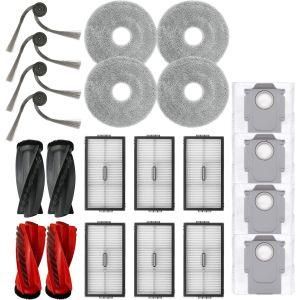
The Plus.Parts® Maintenance Set for the 700 series covers the complete consumable scope in a single order: bristle brush, flexible beater brush, AeroVac HEPA-style filter, and 3-arm side brush, with yellow end-cap bearing material matched to the original iRobot specification. The set is a direct functional alternative to the original iRobot consumables and fits every named 700-series unit without modification. Keeping a complete set on hand means no individual component gets stretched past its interval because one part is on back order, which is the scenario in which secondary load (motor current, bearing wear, battery draw) builds up quietly before any single visible symptom appears on the robot.
How the iRobot Roomba 700 series models differ
The 700 series is a single mechanical platform from end to end. Every model uses the AeroVac Series 2 bin, the same bristle and flexible beater brush pair, the same 3-arm side brush, and the same Home Base — which is why the consumable maintenance set is universal across all sixteen named units. The two differences with direct maintenance implications are the optical bin sensors introduced at the 770, and the battery chemistry change introduced at the 780. Neither changes the consumable set; both affect how a specific fault should be diagnosed.
Entry-tier models (700, 760, 761, 765 PET): battery runtime as the primary diagnostic
The Roomba 700, 760, 761 and 765 (PET) all carry the 14.4 V NiMH pack and lack the optical bin sensors fitted from the 770 onwards. The NiMH pack’s capacity degrades more noticeably over time than lithium-ion, so any entry-tier unit reporting shorter run times should have its battery assessed before consumables are suspected. A run time below thirty-five minutes on a fully charged entry-tier unit is a reliable indicator that the pack is approaching end of capacity. Because these models lack optical bin sensors, a premature full-bin alert is not caused by a dirty sensor — the full-bin indicator on entry-tier units is time-driven and cannot be triggered by contaminated optics. The 765 (PET) is mechanically identical to the 760; the pet designation applies to the box contents only. In a shedding household, the same shortened brush and filter intervals apply across all four entry-tier variants.
Mid-tier models (770 to 776 PET): optical bin sensor care and NiMH battery timeline
The Roomba 770 is the first 700-series model to carry optical bin sensors, and every mid-tier unit from the 770 through the 776 (PET) includes them. These sensors require a dedicated fortnightly wipe with melamine foam. A filmed optical window inside the bin chamber lowers the debris threshold at which the full-bin alert fires, causing the robot to return to dock mid-cycle with a bin that may still be under half full. If a mid-tier unit consistently completes shorter runs than expected, clean the optical windows before drawing any conclusion about coverage or route programming. The 772e and 772 differ by a bundle detail only; the 774 is the standard European mid-tier hardware. The 775 (PET) and 776 (PET) are hardware-identical to the 774. All mid-tier units retain the 14.4 V NiMH battery, so the eighteen-to-twenty-four-month replacement window applies across the full group.
Top-tier models (780 to 790): XLife battery planning and extended intervals
The Roomba 780, 782, 782e, 785, 786 (PET) and 790 use the XLife 14.4 V lithium-ion pack, which extends the expected battery replacement window to approximately thirty to thirty-six months under daily use. For service planning, this means a slow-running top-tier unit is more likely reporting a consum



The Roomba 770 brush replacement cycle is longer than I expected, but skipping it shows. Performance drops gradually and you notice all at once.
I’ve had the Roomba 772 for about three years now. First time I’ve actually understood what the maintenance set includes.
My Roomba 700 had a grinding noise for weeks. Traced it to a dirty brush roller, sorted in under 10 minutes with this guide.
My partner thought regular maintenance was unnecessary. One look at the filter condition after two years changed that view.
Guide is clearer than the iRobot app for the Roomba 780. The end-cap section especially, that part is never explained anywhere else.
Three years with the Roomba 760 and this is the first time I’ve actually understood the maintenance logic. Ordered the full set.